
In the empower® Ribbon, however, the text group is linked to your corporate design. Therefore, it represents only the specifications that are in line with your company's corporate design.
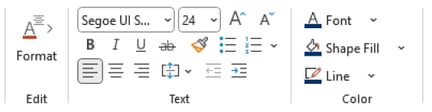 Text and Color in PowerPoint
empower® does not affect the Office built-in right-click access to font and color information. All Office built-in formatting options, which do not necessarily coincide with your corporate design, are still available.
Text Settings
In the subgroup Text, you have access to all fonts and font sizes that match your company's corporate design.
In the bullet options, you can choose from the predefined bullet styles from the master template in use.
In addition, you have all formatting options, including text alignment options.
Color Settings
In the subgroup Colors, you can choose from a predefined set of font colors, shape fill colors and line colors. All available colors match your company's corporate design.