
The empower® sync is the application empower® uses to cache files from the empower® cloud to your local machine. The sync runs at least once per day, or every time you restart your computer.
To manually run a sync follow these steps:
- In the Mac system tray (top right of screen) click on the empower® sync icon (far left icon below)

- A dropdown will appear where you can manually run the empower® sync
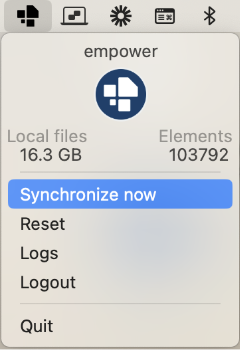
- Select the 'Synchronize Now' button to manually run a sync
Explainer video: Click here to watch how to run a Mac empower Sync
 Book a call or a meeting to learn how empower® Express can help you and arrange a demo
 Contact us (support@empower.express) if you have any questions
 Click here to learn more and sign up for a free trial
 Click here to book a call with our technical support team