
- Ensure PowerPoint and Excel are closed
- Depending on your version of MSOffice and your operating system, search for 'Add/Remove' programs in the search bar in the task bar at the bottom of your screen and go to the Settings - Apps area
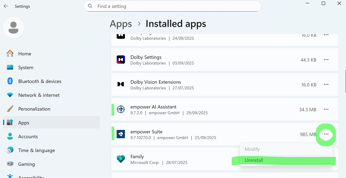
- Find 'empower Suite' in the list of installed apps
- Click on the three dots on the right and select the 'Uninstall' options
Watch this video for more details:

 Book a call or a meeting to learn how empower® Express can help you and arrange a demo
 Contact us (support@empower.express) if you have any questions
 Click here to learn more and sign up for a free trial
 Click here to book a call with our technical support team