
Before installing
-
Download the install file.
-
Unzip or extract the downloaded install zip file.
-
Ensure that the MSI installer and the Payload folder remain in the same folder when you run the MSI installer.
-
Please note that as the installer is a 'per user', it must be installed in the user context.
Command Line
Below is the basic command line:
msiexec /i empowerSuite-express.msi /q /l*v installer.log
ADDLOCAL=PowerPoint,charts,sync,autoupdater
Important: Please do not forget the ADDLOCAL section of the command line.
Frequent Questions
Question |
We have installed empower® via command line. Why is empower® not visible on the user's profile? |
Answer |
Did you install from a network drive (for example: OneDrive, or any kind of fileshare system) i.e. you did not install from a local location? |
Question |
Why do we receive the following error message?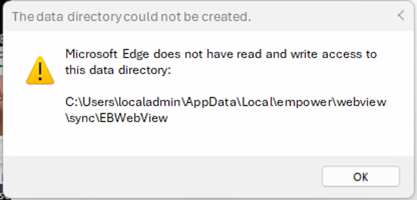 |
Answer |
This error message implies that empower® was installed via local admin and that the user does not have admin rights to this location. Installing from this location will therefore not work. |
Question |
How do we uninstall via Command Line (CMD)? |
Answer |
To uninstall, please use the below command line: msiexec /i empowerSuite-express.msi /q /l*v installer.log REMOVE=PowerPoint,charts,sync,autoupdater |
Question |
We are unable to use a 'per user' installer due to restrictions within our company's IT infrastructure. Is a 'per machine' installer available ? |
Answer |
Please contact us at support@empower.express and provide us with a brief description of the reason you require a 'per machine' installer. Many thanks in advance. |
 Book a call or a meeting to learn how empower® Express can help you and arrange a demo
 Contact us (support@empower.express) if you have any questions
 Click here to learn more and sign up for a free trial
 Click here to book a call with our technical support team