
How permissions are applied
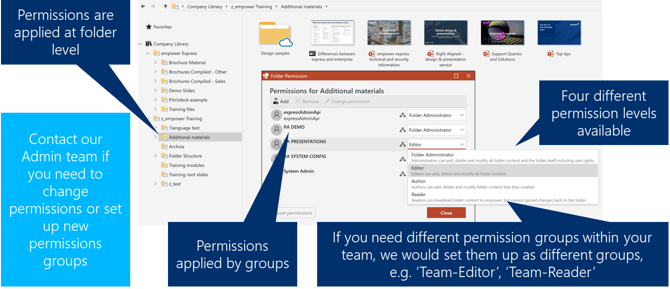
- Permissions are generally applied via groups and teams rather than individual, named users.
- Access permissions in the library are applied at folder level.
When a user is granted permissions at folder level, all the elements (including sub folders) in that folder inherit the specified permissions. However, subfolders can have different permissions applied if required. - There are four levels of permissions available:
- Folder Administrator – Full permissions, reserved for our Admin team to ensure security.
- Editor – Full edit access, allowing users to edit, delete and modify content.
- Author – Users can add, delete and modify content they have created.
- Reader – Users can view and download content, but cannot edit or delete content.
- A common permissions model is to have your admin users set up as an 'Editor' group while other users are set as an 'Author' or 'Reader' group, so you can manage your content control more effectively.
- Email us (support@empower.express) to advise on how you'd like to group your users
- Create the folders required for your content
- Let us know which groups or individual users should have access to which folders
- By default, all users are granted access to all you team folders unless specific restrictions are requested
We appreciate your understanding of these measures, which are in place to uphold the security standards our clients rely on.
 Book a call or a meeting to learn how empower® Express can help you and arrange a demo
 Contact us (support@empower.express) if you have any questions
 Click here to learn more and sign up for a free trial
 Click here to book a call with our technical support team