
The empower® Sync is a background process that synchronizes data between the content server (where your files are hosted) and your individual instance of empower®.
Unlike programs like SharePoint, the empower® sync does not run continuously. Instead, it runs every time you restart your computer or after 8hrs of inactivity.
You can also manually push a sync at any point to ensure you are seeing the latest versions of your content.
To manually run a sync
-
First locate the empower® sync icon
- In the system tray of your computer (by the clock at the end of your taskbar), click on the up arrow to find the empower® sync icon.
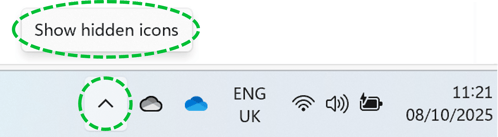
- In this area you will see the empower icon. Drag this onto the main bit of the taskbar, to make sure it is always visible.
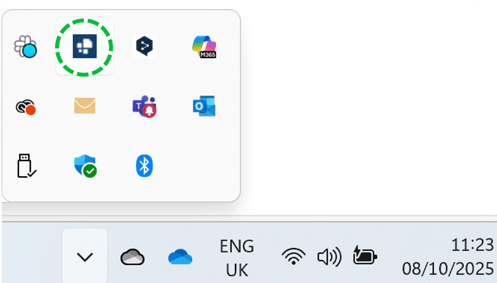
- In the system tray of your computer (by the clock at the end of your taskbar), click on the up arrow to find the empower® sync icon.
- Once you've located the empower® icon, you can click on the 'Sync Now' option to push a sync to update your library content.
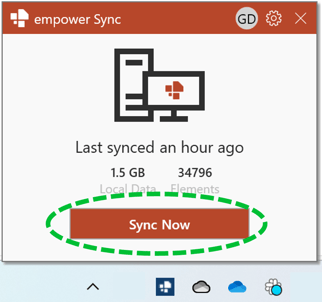
This action will start the sync process and any content and changes to data that has been updated, added or deleted since the last sync will now be visible.
In the sync window, you can see when the last sync was performed and the size (and number of elements) in your accessible content.
Watch this video for more details about the sync process and how it all works:

 Book a call or a meeting to learn how empower® Express can help you and arrange a demo
 Contact us (support@empower.express) if you have any questions
 Click here to learn more and sign up for a free trial
 Click here to book a call with our technical support team