
-
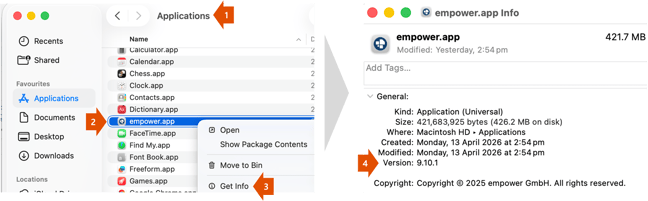
Open a Finder window
-
Selecting “Applications” in the Favourites bar
-
Right-clicking on the “empower.app” entry
-
Selecting “Get Info”
-
The version number is in the “Version” field in “General” section of the screenshot
Alternatively: Click here to watch a video on how to do this
 Book a call or a meeting to learn how empower® Express can help you and arrange a demo
 Contact us (support@empower.express) if you have any questions
 Click here to learn more and sign up for a free trial
 Click here to book a call with our technical support team