
The set up process typically develops throughout your trial period at your own pace. The set up can take anything from a few days to a few weeks, at your convenience.
An ideal process would be to start with a trial and explore the tools. Book a call with us to explore how empower® can enhance your workflows and working practices. Then build your resources and once ready, launch it to your wider team. The empower® team is with you every step of the way.
Contact us at any point to discuss your options and how empower® Express can help you.
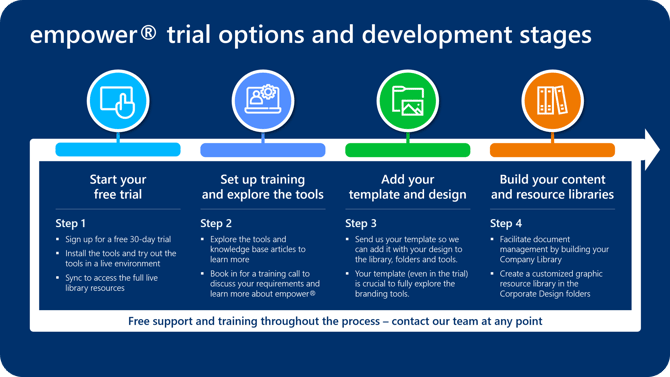
Step 1 – Start your free trial and install the tools
-
Check your email for the install and download instructions
-
Click on the provided link to download the package
-
Install the tools on your machine, which may take 10-20 mins to complete as it builds your library content
-
Reboot your machine for best results
Step 2 – Set up training and explore the tools
- After installation, explore the tools available in the empower® ribbon
- Check your email for a link to the knowledge base to:
- Find articles for quick and detailed introductions to all tools
- Access resources for specific issues, e.g. rebranding, Excel linking, creating a resource library
- Schedule an introductory call for personalized guidance, to discuss your requirements and to learn about all the useful tools and features in empower®
- Plan for additional training sessions as needed throughout your empower® journey
Step 3 – Add your template and design
- Email us your template files and any branding information
- We will implement your design and template into the library, so you can fully test and explore the branding tools
Step 4 – Build your content and resource libraries
-
Arrange a call with our team to go through how to effectively set up useful library content and design resources to make reusing and creating content in PowerPoint fast and on brand
- Start building your company library content folders to quickly compile presentations and reuse content
- Organize your design assets in the Corporate Design Templates folders for quick creation of new content
Next steps – Once your library is fully set up, introduce the tools to your wider user group
Continuous support throughout the process
- Use the links below to contact the empower express team for support during your trial and set up
- Use the links below to book in for training. We provide training and support free of charge throughout your subscription
Watch this video for a overview of the set up and trial process
 Book a call or a meeting to learn how empower® Express can help you and arrange a demo
 Contact us (support@empower.express) if you have any questions
 Click here to learn more and sign up for a free trial
 Click here to book a call with our technical support team