
The update links functionality is a key piece of the empower®content library. It allows you to easily update your content and ensure the integrity of your data.
Slides can be linked together in a parent - child type relationship, so that when the parent slide is updated, the linked child copy can be automatically updated at the same time.
How to create links
Links can be created in two ways:
-
Insert a slide from the library
-
-
When you insert a slide from the library, this slide contains a unique ID tag
-
When you then save the new content (including the inserted slide) back to the library, the link relationship to the original inserted slide will be created, with the original slide being the master parent and the new slide is a linked copy
-
-
Create links through the update links tool within the library window
-
Click on a slide to select it as a ‘child’ slide and use the Update links function to select the ‘Mark for new root’ option
-
Then select the new master root parent slide and use the Update links function to create the link to the parent.
-
You can add additional child copies and keep adding them to the parent root to create families of links.
-
How to manage or edit your links
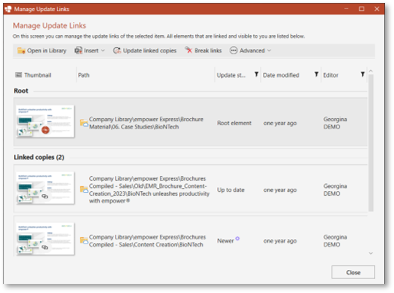
The Manage Update Links tool allows to manage all aspects of the linked structure and status.
Watch this video for more details on how to use update slide links in empower®:

 Book a call or a meeting to learn how empower® Express can help you and arrange a demo
 Contact us (support@empower.express) if you have any questions
 Click here to learn more and sign up for a free trial
 Click here to book a call with our technical support team