
Repetitive formatting slows teams down. Layout tools make sizing, positioning and formatting quick, easy and consistent. Layout tools support your template and key brand elements. Effective formatting, consistency and perfect alignment becomes easy to achieve. Explore the Layout tools to see how much easier working with PowerPoint can be.
|
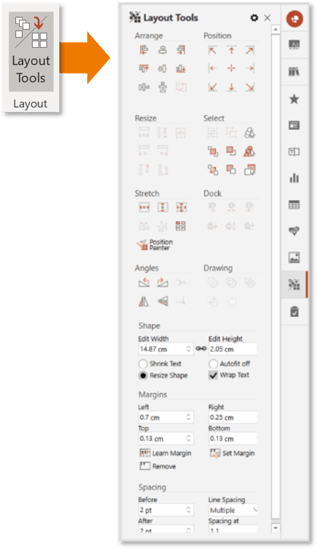
Arrange: Align, align to selected reference object, distribute horizontally and vertically, swap positions Position: Positions items to the according to the core drawing area Resize: Resize shapes to match sizes – height, width of both Select: Group and ungroup, arrange order, select same objects, select same colours, open selection pane Stretch: Resizes to the width and height of the core page, set spacing between shapes and position painter Dock: Aligns two or more objects, glues them together Angles: Rotates, flips and adjusts corners Drawing: Create new custom shapes, but union, fragment, combine, subtract, intersect tools Shape: Sizes and adjusts shape behaviour Margins: Allows for quick setting, copying and applying margin settings Spacing: Allows for setting line and paragraph spacing |
|
Watch this video to explore the Layout tools

 Book a call or a meeting to learn how empower® Express can help you and arrange a demo
 Contact us (support@empower.express) if you have any questions
 Click here to learn more and sign up for a free trial
 Click here to book a call with our technical support team